Roster Sync Pro booking calendar with restaurant reservation demand

Restaurant reservations and F&B demand

Restaurant Booking and Reservation Software

RSP turns customer reservations into operational demand. Accept online bookings, protect capacity, manage the booking queue, and see booked covers beside staff coverage before the day is worked.

Public

reservation page from the customer profile

Capacity

rules, holds, cutoffs, and overrides

Demand

booked covers beside schedule coverage

Public booking intake

Customers reserve from a branded page. Managers keep control.

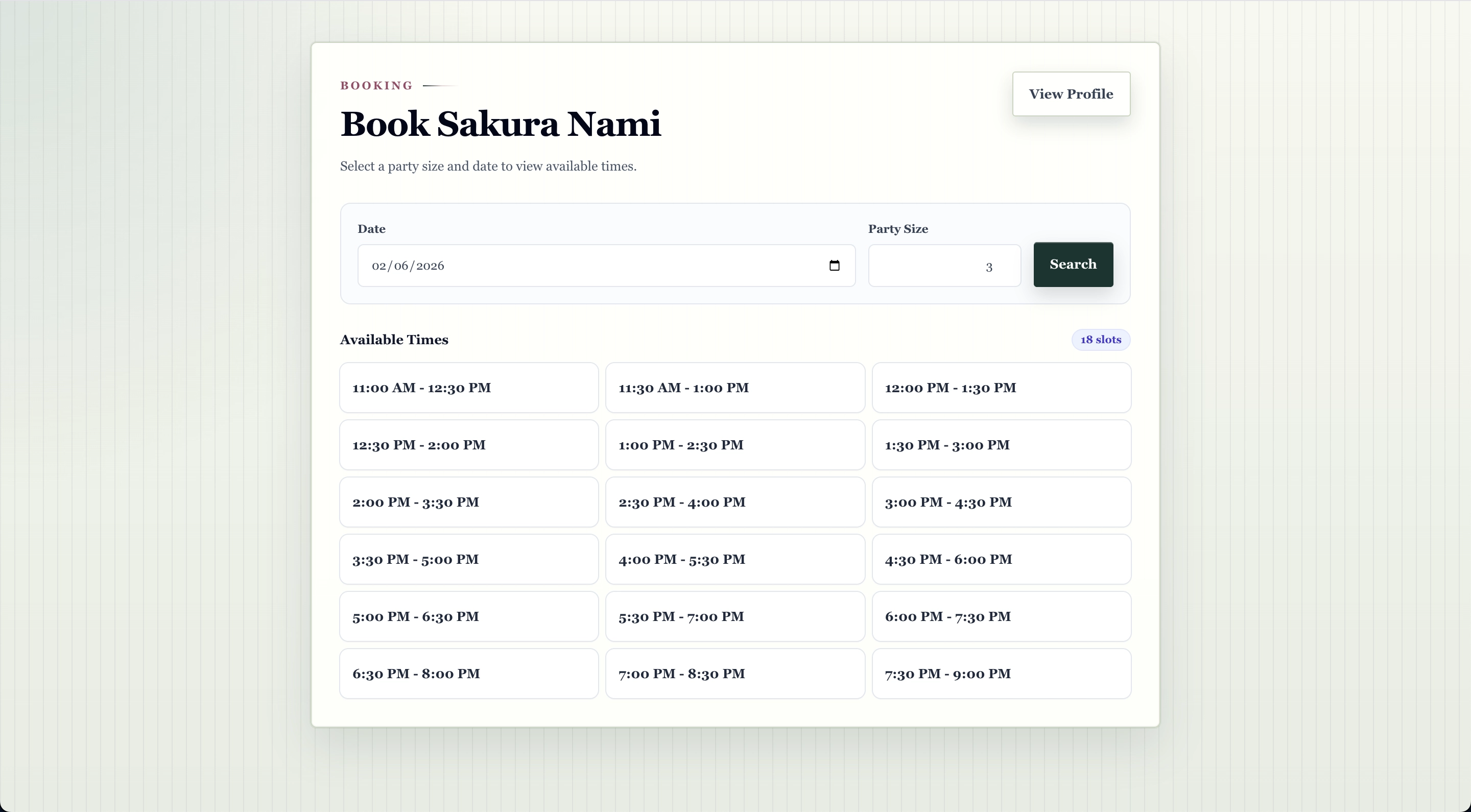
Customers choose party size, date, time, and contact details from a restaurant booking page connected to the company's public profile. RSP can hold the selected slot, apply reservation rules, and create either a pending request or confirmed reservation.

Public Profile booking action for customer discovery
Online reservation slot selection backed by the same availability engine managers use
Manual or automatic confirmation modes
Submit-adjacent terms and privacy acknowledgement
Roster Sync Pro public booking page with available reservation slots
Roster Sync Pro mobile public booking confirmation form

Capacity protection

Booking rules protect the room before the request is accepted.

RSP treats capacity as an operating rule, not a note. The reservation engine checks hours, lead time, party size, turn time, holds, active bookings, blackouts, and per-slot pacing before a booking can be created.

Booking hours

Use public business hours or dedicated booking hours for service windows.

Pacing controls

Limit covers and booking count by slot, day, time window, or party size.

Temporary holds

Hold a selected slot while a customer completes the final step.

Exceptions

Close dates, narrow availability, or block special service windows.

Roster Sync Pro booking settings capacity rules
Roster Sync Pro booking slot modal showing capacity, holds, and bookings
Roster Sync Pro manager bookings queue
Roster Sync Pro mobile booking operations queue

Manager operations

The reservation queue works where the floor team works.

Managers can review pending requests, confirm bookings, update details, cancel, mark complete, mark no-show, and reopen terminal bookings when needed. Phone-only and manual-contact bookings stay visible until staff act on them.

Desktop queue

Filter by day, status, source, customer search, and booking demand.

Mobile actions

Review today's and upcoming bookings, tap contact actions, and manage lifecycle changes on the floor.

Activity history

Lifecycle changes, customer communication state, and manager actions remain traceable.

Demand meets coverage

Booked covers appear beside staffing, not in a separate reservation silo.

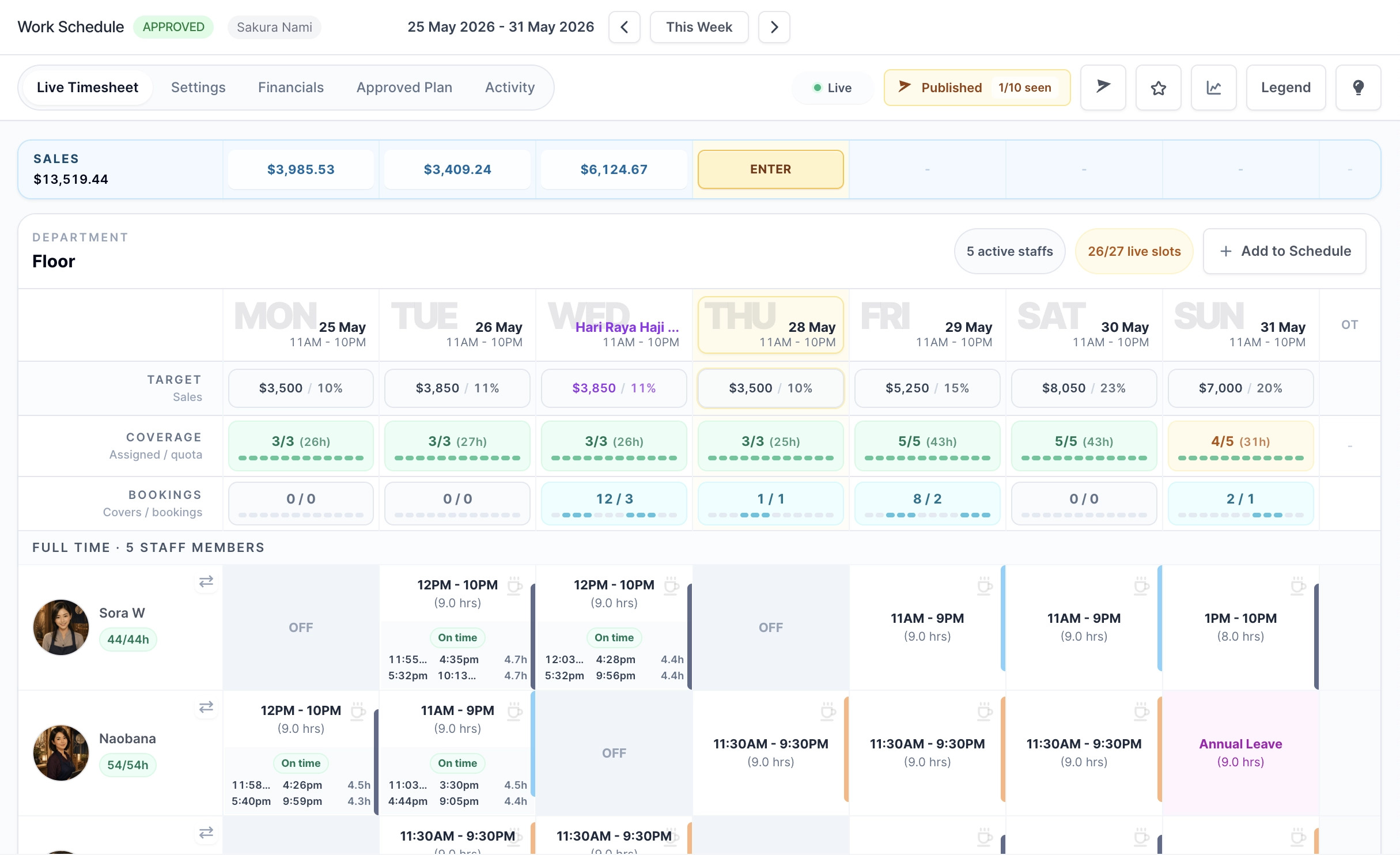
Schedule managers can see booking demand as aggregate covers and booking counts while planning. The calendar keeps booking demand compact, with a Bookings row under Coverage so managers can compare demand timing with planned staff coverage.

Week Setup demand context before managers set the week
Draft and live calendar indicators with covers/bookings
Simple time-of-day demand bar below the coverage bar
No customer names, phone numbers, emails, or notes in schedule surfaces
Roster Sync Pro timesheet calendar with booking demand row under coverage
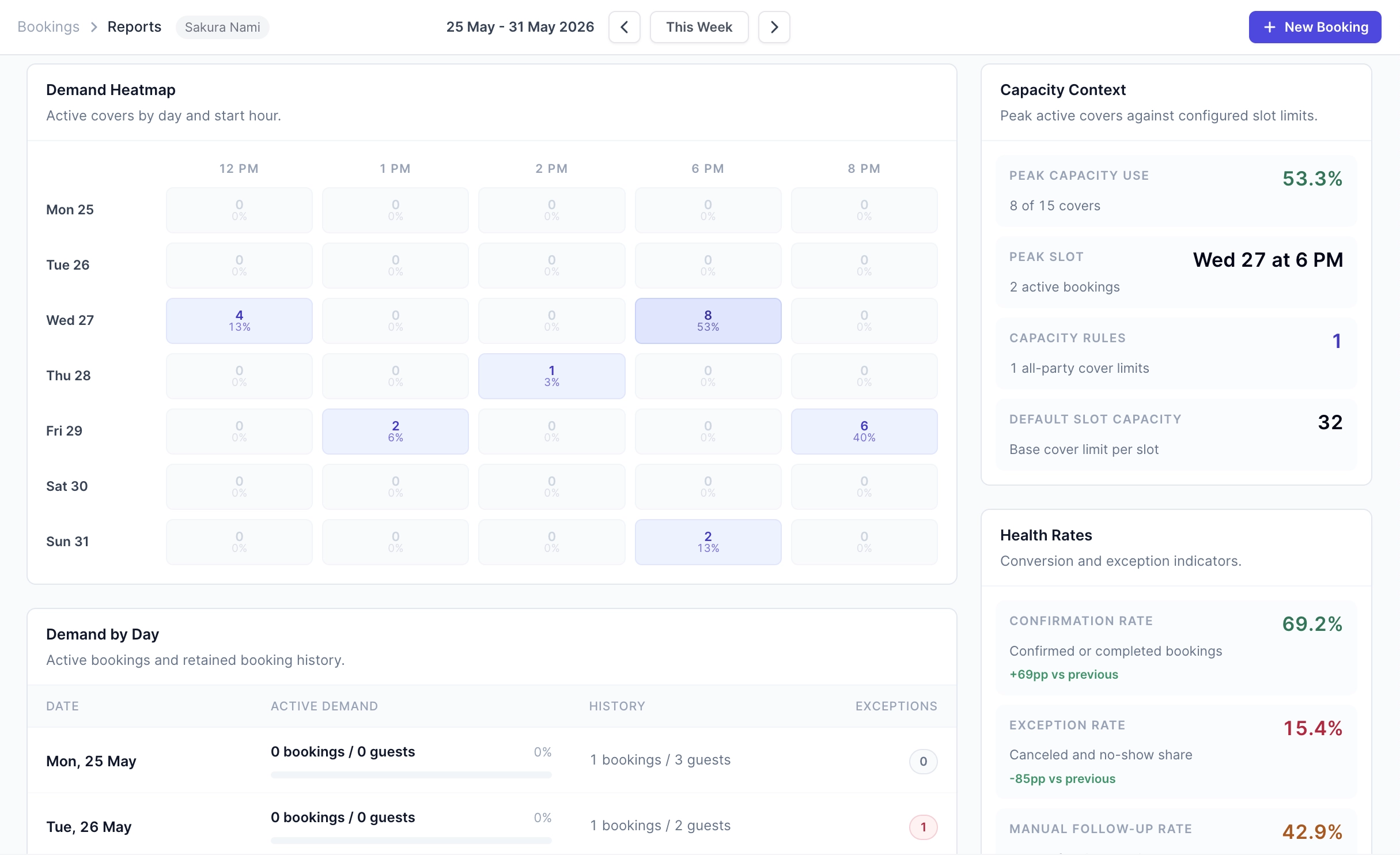
Roster Sync Pro booking reports with demand heatmap

Booking reports

See booking patterns before they become staffing assumptions.

Booking reports summarize active bookings, covers, status mix, source mix, peak slots, and demand heatmaps. Use reports to understand repeat service patterns before adjusting roster templates or coverage targets.

Day / week / month

booking demand periods

Hour heatmap

active covers by start time

Status mix

pending, confirmed, complete, no-show

Source drilldowns

public web, phone, WhatsApp

Public profile and WhatsApp

Give customers a route in, then keep the engine deterministic.

Public Profile can expose the booking action, while WhatsApp booking workflows can route customers into a guided Flow. Availability, holds, capacity checks, booking creation, reminders, and cancellation links still run through RSP's booking engine.

Public Profile booking action on mobile and desktop
WhatsApp channel setup for guided booking workflows
Manual handoff when messages need staff review
Bookings Management permission keeps customer booking operations scoped
Roster Sync Pro mobile Public Profile with booking action
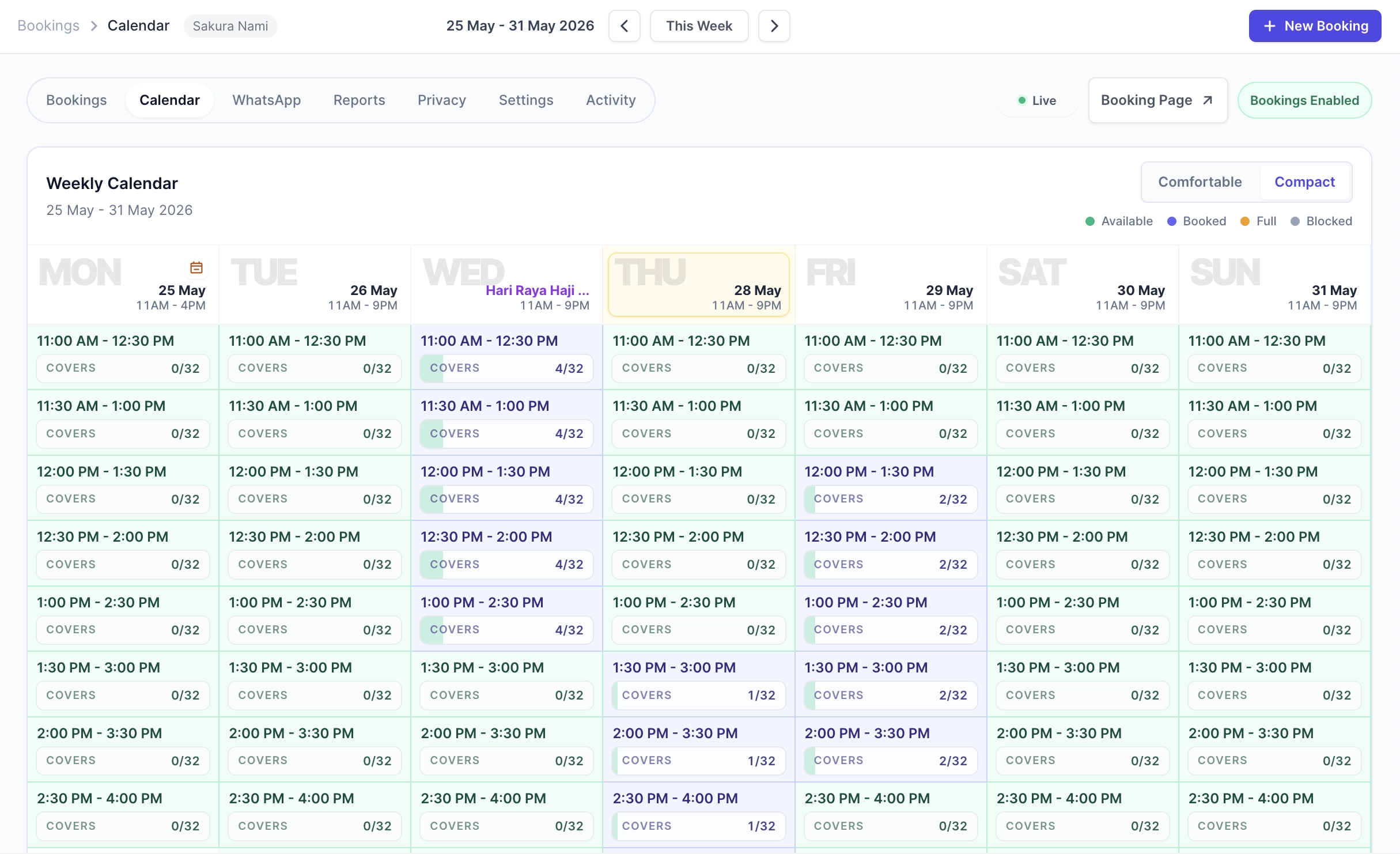
Roster Sync Pro booking calendar with operational booking visibility

Trust and security

Practical controls for sensitive workforce information.

RSP keeps access, payroll visibility, export behavior, and billing responsibilities clear so owners can delegate work without handing every sensitive detail to every manager.

Detailed permissions

Access can be separated across Schedule & Attendance, Financial Visibility, Billing Management, staff administration, leave, approvals, and Access Control.

Financial Visibility

Wage-sensitive labor cost, recorded pay, overtime pay, and payroll export columns require Financial Visibility instead of routine schedule access.

Export details

Data Export requests can show the company, requester, date prepared, company time zone, filters, date range, and selected columns.

Scheduled reports

Scheduled Data Export reports generate files in Downloads and notify the creator when ready; sensitive files are not sent as email attachments.

Activity history

Important actions such as export downloads, permission changes, schedule changes, finalization, and amendments are recorded where the process needs a review trail.

Billing clarity

Subscription checkout, payment methods, and invoices are handled through Stripe-hosted billing pages, so RSP does not store card details in the app.

FAQ

Restaurant booking and reservation questions.

Short answers for F&B teams comparing online reservation intake with staffing visibility.

Which plan includes restaurant bookings and reservations?+

Native bookings are included on Scale. Booking routes also depend on booking settings and Bookings Management access for manager operations.

Does RSP replace public profile hours with booking hours?+

No. Public Profile hours stay focused on customer-facing business details. Booking availability is controlled by booking hours, special hours, blackouts, holds, and capacity rules.

Can managers create phone bookings?+

Yes. Managers can record phone-only bookings and keep manual-contact bookings visible when staff follow-up is needed.

Does booking demand automatically change the roster?+

No. Booking demand is planning context. It appears as aggregate covers and booking counts so managers can decide how to adjust coverage.

Can staff see customer booking details from the schedule?+

No. Schedule-facing indicators show aggregate demand only. Customer names, emails, phone numbers, and notes stay in booking-manager surfaces.

How are customer privacy requests handled?+

Booking privacy workflows can redact customer-identifying details from booking and customer-contact records while retaining de-identified operational booking history.

Put booked covers in the same operating loop as labor.

Start with Scale when restaurant bookings, capacity controls, manager operations, and schedule demand indicators are part of how your team runs the week.

Secure Payments By